Tuesday, 4 December 2012

What does it mean to be a digital native?

0

LeWeb is Europe's biggest tech conference, and will take place in Paris from December 4 to 6. CNN will be reporting live from the ground over the three day event and bringing you the news as it happens from the biggest names in tech. Follow our reporters Stepheine Busari and Irene Chaple on Twitter.
 -- The war between natives and immigrants is ending. The natives have won.
It was a bloodless conflict fought not with bullets and spears, but with iPhones and floppy disks. Now the battle between the haves and have-nots can begin.
The post-millennial "digital native," a term coined by U.S. author Marc Prensky in 2001 is emerging as the globe's dominant demographic, while the "digital immigrant," becomes a relic of a previous time.
The digital native-immigrant concept describes the generational switchover where people are defined by the technological culture which they're familiar with.

Prensky defines digital natives as those born into an innate "new culture" while the digital immigrants are old-world settlers, who have lived in the analogue age and immigrated to the digital world.
Although not Luddites, the immigrants struggle more than natives to adapt to hi-tech progress.

The author of "Teaching Digital Natives," whose success pushed him onto the speaking circuit, says the explosion of technology over the last 10 years is just the start of a symbiotic new world. Computers and handsets are becoming an extension of body and mind, creating a Cyborg-like population.
Prensky cites the 100-meter runner Oscar Pistorius, an athlete with prosthetic legs, as an example of how technology is used to enhance our lives. He told CNN: "For humans, what used to be this body of flesh and bone, all that is now just the center... Being human is a moving target."

The human race and its struggle to keep up with technology

Prensky says that at no time in history has technology moved so fast. Today the latest high-tech gizmos can be passe even before hitting the shop floors.
In the past -- during the post-industrial revolution era, for example -- accelerating technology has plateaued. So, with the meteoric rise of new social media outlets including Facebook, Twitter, YouTube and Skype, history suggests the world is overdue for a slowdown.

But Prensky says this time, any slowdown in the digital age is a "myth," as innovation will only press forward "faster... And faster and faster."
He told CNN: "We are not going through a transition to another faze of stability, and that is the key point. People will always be behind now and that will be a stress they have to cope with."
The new norm
Connecting with one another in the modern world requires a knack for social networking and texting, which is the norm for the digital native. But for the immigrant, it can be akin to learning a whole new language.
For humans, what used to be this body of flesh and bone, all that is now just the center.
Marc Prensky, U.S. author
Prensky illustrates his point with former director of the CIA David Petraeus. In November, he was embroiled in a scandal that revealed he had an affair with Paula Broadwell.
The FBI uncovered the affair while it investigated e-mails that Broadwell allegedly sent to a Petraeus family friend, Jill Kelley.
Prensky labels this naivety by immigrants as "digital stupidity" -- by assuming that when people decide to post online or send e-mails, they believe privacy is automatically applicable.
"People get frightened by change and they should be. They need courage to face the future these days, especially those who feel left behind." Prensky said. "People adapt instinctively and humans are very good at that. The young people live in the context; the older people see the changing context and struggle."

Digital poverty

As technology filters into every corner of the globe and tech cities spring up in some unlikely places from Bangalore to Tel Aviv, a new gulf is emerging to separate the digitally savvy from the disconnected: Poverty.
In India, over two-thirds of the population live on less than $2 a day, according to the World Bank. But a United Nation's Report still says that mobile phones are more common than toilets, with nearly half of India's 1.2 billion population armed with a handset.
Nishant Shah, a director at the Centre for Internet and Society in India, told CNN that defining natives and immigrants by generation is a "serious concern." According to Shah, Prensky's views were formed from the "privileged" position of living in the U.S.
Shah added: "[Prensky's] observations may describe a generation gap that the U.S. faced, but if you transplant the same definition to other parts of the world, natives are sometimes indistinguishable from immigrants."
The real fear for Shah is the new hierarchies created by digital literacy and the class systems that will be shaped by access to digital technologies.

The call of the developing world
 
People will always be behind now and that will be a stress they have to cope with.
Marc Prensky, U.S. author
As mobile networks extend their reach and areas become increasingly urbanized, Western tech companies are seeking to tap markets with large populations.
Last year, Finnish phone maker Nokia released a range of smart phones targeted at consumers in emerging markets, particularly in Asia, to compete with cheaper Android devices.
But Shah argues bombarding a country with technology and infrastructure is not a rounded solution to the digital poverty problem.
India, for example, has connectivity and access in abundance, but the country continues to suffer from a generation of "digitally poor classes." He argues that simply providing the equipment does not help young people understand how that technology can better their lives without education and training.
Shah told CNN: "Just because young people have tech access in India, it doesn't make them digital natives." He added, "It creates digital outcasts -- people whose supposed problem of access to the world has been resolved."
Prensky, however, believes a "networked planet" is a sign developing nations will soon close the digital divide. Even those who don't yet have the technology still know that it exists, and will have it before long.

The world in 2020

By 2020, Prensky predicts people across the globe will be plugged into the "AORTA," -- Always on real time access -- a term coined by Mark Anderson, the chief of the Strategic News Service -- specializing in technology news. A future in which people are constantly able to access information and news from anywhere on the planet.
Shah says that the works of science fiction may offer the most accurate insight into our futuristic society.
He said: "The presents that we live in, are the futures that our pasts have imagined."
"Let us hope that the technologies of the future will also be designed to protect that which is sacred, and that which is important in our own understanding of being human."


The State of Smartphones in 2012: Part I of our Ultimate Guide

0

We review the landscape and name the best in multiple categories. And it's just the beginning.

 The last six months or so has seen a veritable storm of high-end smartphones. While you can generally count on new hardware being released year-round, this holiday season is particularly busy. Between the iPhone 5 ,iOS 6, the Nexus 4, Android 4.2, and Windows Phone 8, things have changed quite a bit since the summer.

Even more exciting, the smartphone wars aren't just a two-horse race anymore. Apple and Samsung continue to be the giants in the field, but we're seeing attractive handsets from a newly competitive LG, a Google that seems more eager than ever to show its Android partners how it's done, an HTC that's eager to thin out its product portfolio and reverse its ill fortune, and a Nokia that really wants its bet on Windows Phone to pay off.
We know all this new hardware and software can be hard to keep straight. To that end, we'll be taking some time over the next few weeks to go in-depth on the state of the smartphone: we'll be examining not just the available hardware and software, but also which hardware and software will work best for particular uses. More than ever, smartphones are powerful devices that can handle an increasingly large amount of the work formerly unique to full-fledged computers. But just like the PC market, the hardware and software you buy is going to depend on what kind of things you need to use it for.
For the purposes of this overview, we're going to be focusing on current, high-end iOS, Android, and Windows Phone 8 handsets. These aren't the only players in the field, but they're certainly the most consequential: smaller platforms like Tizen, Open WebOS, and Firefox OS are either still in development or not widely available commercially. As for BlackBerry, RIM seems to be all but begging users, developers, and the press alike to wait for BlackBerry 10 to come out before writing it off... so that's what we'll do. Expect more coverage of RIM's latest as its projected March 2013 launch date approaches, but BlackBerry won't factor into today's discussion.
To kick off this series, we'll examine each platform's major strengths and weaknesses, then dive into specific phones and use cases.

The Platforms

iOS

/ iOS 6.0.1 on the iPhone 5.
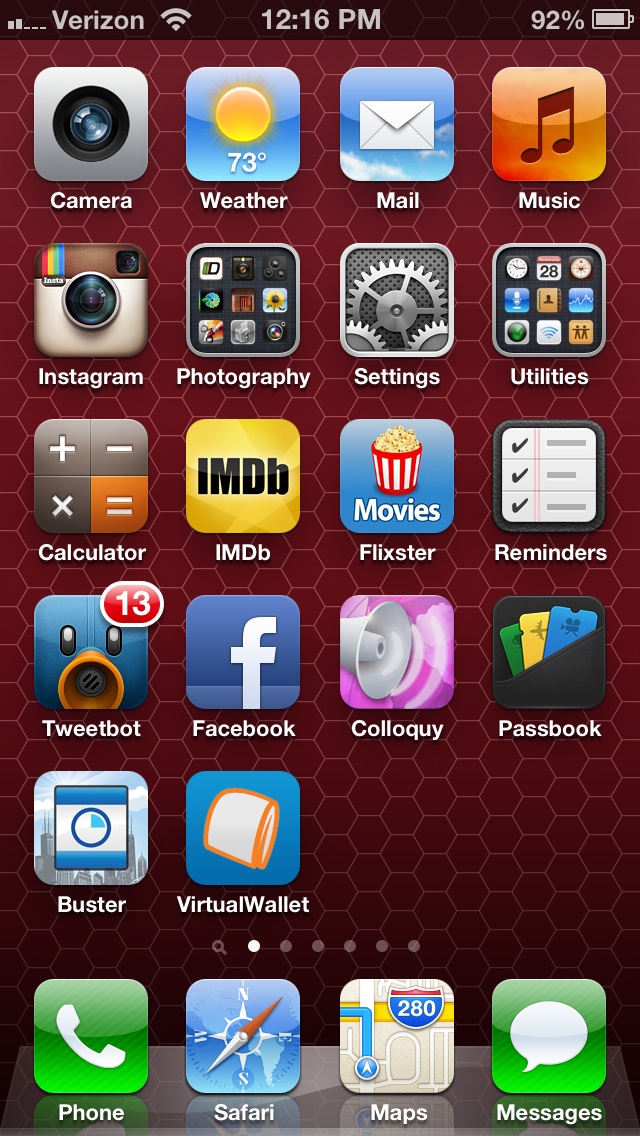
However you feel about Apple, iOS and the iPhone redefined the smartphone market when they were released in 2007. Five major OS updates later it's still a solid platform; Apple has added its own unique features (iCloud, Siri, Passbook, and others) to keep the iPhone fresh, while borrowing the best features from other platforms (the Notification Center, in particular) to keep it competitive. In iOS, Apple focuses on creating a smooth and responsive experience above all—the screen usually reacts instantly to touch, and even in cases where applications don't launch instantly, Apple makes good use of animations and transitions throughout the system to let users know that their input has been recognized.
The biggest draw of Apple's smartphone platform continues to be its vibrant third-party application library. There are problems, both real and imagined, with Apple's opaque application approval process and the limitations imposed by its sandboxing model. But the breadth, depth, and general level of polish among the applications available trumps both Android and Windows Phone.
This is because, generally speaking, the iOS platform is pretty developer-friendly: compared to Android there are just a few different devices and screen sizes that must be tested against. iOS users tend to both download more apps and to pay more for those apps as well. There may be restrictions on what developers can do, but if you're looking to earn a return on your investment, Apple's platform is the one to beat in the mobile space.
Gaming, in particular, is one of Apple's strengths. The development environment attracts not just big mobile game publishers like Rovio or Halfbrick, but also droves of independent developers who put out small-but-memorable titles like Tiny Wings and 10000000. Apple's products tend to have more powerful graphics processors than most competing phones as well.
The other benefit to buying into the iOS platform is the hardware's relative longevity. iPhones tend to receive regular software updates (and their accompanying new features, security patches, and stability enhancements) for years after their release, regardless of which carrier you prefer. The most recent version of iOS runs on four generations of iPhone, reaching all the way back to 2009's iPhone 3gs. Not all phones support all of the operating system's features, but the general feature set, look and feel, and (more importantly for developers) list of supported APIs is consistent across all of the phones.
All of that said, the platform's biggest weakness (at least for some users) is its inflexibility. Apple controls every aspect of the user experience, meaning that if you don't like its app launcher, keyboard, or default Web browser and e-mail programs, you can't do much to change them. (Alternative programs for many tasks do exist, but Apple's restrictions prevent them from becoming fully integrated into the operating system.) iOS's home screen is also the least flexible of our chosen mobile platforms. You can only arrange app icons and folders into a grid on the home screen, but these icons are static images that can't provide information dynamically. Yes, each icon can display a number to alert you of items that need your attention, but what this number means can vary widely from app to app. Application widgets can't be placed on the home screen, and third-party developers can't produce widgets for the Notification Center either. Simply put, iOS is the way it is. That won't be a problem for many users, but it can feel unnecessarily restrictive to others.

Android

/ Android 4.0.4 on the LG Optimus G.
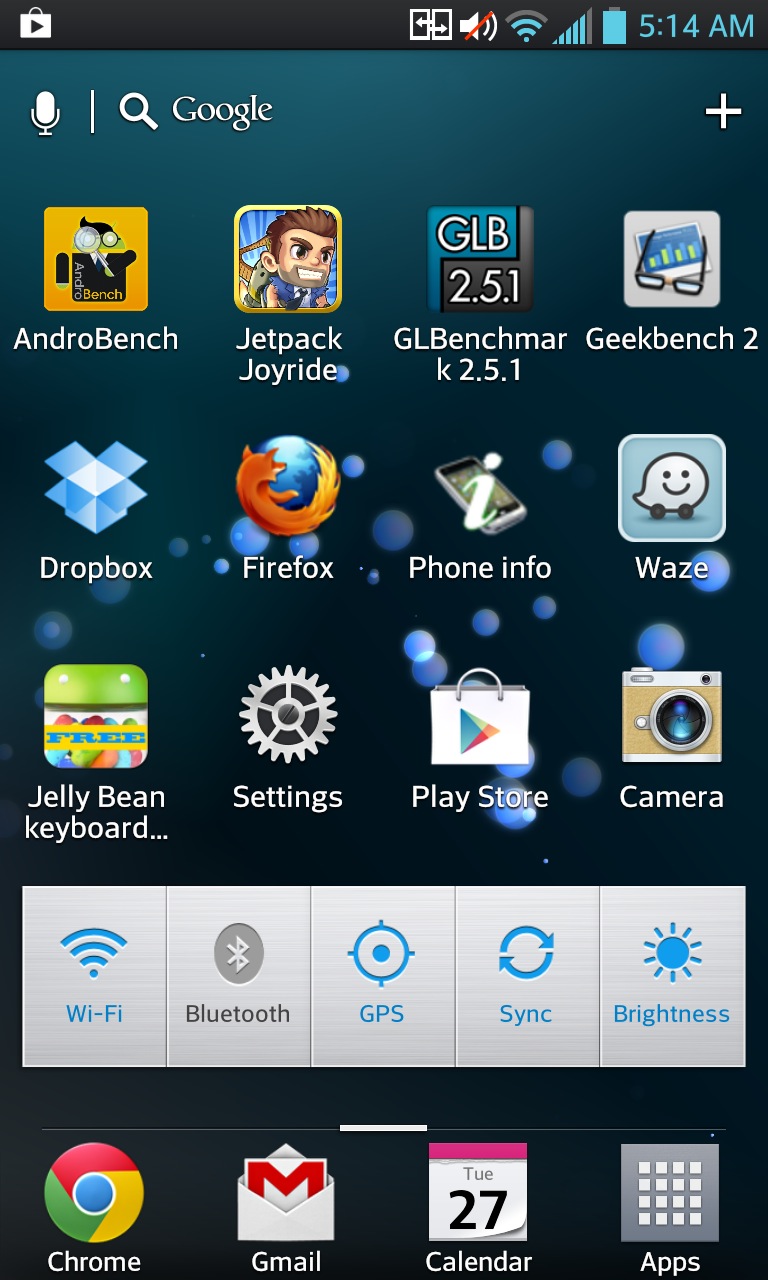
iOS' greatest weakness is in many ways Android's greatest strength: the platform is almost infinitely flexible. Google provides an increasingly polished, cohesive base operating system. On top of it, handset makers, carriers, the open source community, and even end users can build basically anything they want. Don't like Android's icons? Change them. Don't like how the keyboard works? Replace it. Don't like the layout or operating of the default home screen? Install a new one. Many alternatives exist in the Google Play store, which places relatively few restrictions on the kind of apps developers can and can't offer.
This lack of restrictions also allows applications to work together more freely, as they can on a more full-fledged computer. Android's Intents system allows an application to tell the operating system what it can do—open a link, upload a file, send a Tweet, and so on. Any application that needs to perform one of those activities can then choose among different applications and services on the phone. A link in an e-mail can be opened in either Firefox or Chrome by default, for example, where in iOS only Safari can open links by default.
The home screen itself is also pretty flexible. Like iOS, you'll mostly be using static icons to launch applications, but Android also allows the use of widgets to view small amounts of information without having to jump all the way into an app. If you just want a birds-eye view of your calendar or inbox, or if you'd like quick access to settings like screen brightness and whether Bluetooth is enabled, widgets will let you do all of that more quickly and more flexibly than in iOS.
All of this flexibility in software also extends to greater flexibility in hardware—Android's open nature allows just about anyone to use it on their phones (and just about everyone does). Android phones are a diverse bunch, but generally speaking the high-end phones tend to use larger, higher-resolution screens and fast processors with more cores. These features do, however, generally come at the cost of reduced battery life.
For all of its virtues, Android's extreme flexibility means it's also plagued by another F-word: fragmentation. Android looks and acts similarly on different phones, but not identically. Each manufacturer's UI skin requires a certain amount of getting used to, making it more difficult to hop from phone to phone. Phone makers and carriers are also notorious for taking a devil-may-care approach to software updates, meaning most handsets are running older versions of Android that are missing security patches and recently introduced features. If you want to avoid this problem, you can always buy a phone or tablet from Google's Nexus line, which is treated as a "reference" platform for Android and tends to get new software updates promptly for a few years. No other third-party manufacturer has committed to releasing timely updates for any amount of time.
This fragmentation also means the experience of using Android can vary widely from handset to handset. Android, especially in versions prior to the first "Jelly Bean" release over the summer, has long had issues with user interface smoothness. Things like scrolling and swiping are sometimes jerky and inconsistent. Android phone makers have tried to compensate for this by throwing ever-faster hardware at the operating system, and indeed, a phone running a quad-core Qualcomm Snapdragon chip tends to feel speedy regardless of what version of Android it's running. All of the Android phones we recommend feature Snapdragon chips (as do the Windows Phones, for that matter). OEM and carrier-installed skins can still bog things down, though. I find that Samsung's TouchWiz and HTC's Sense UI, in particular, both tend to bog things down even if you're running the supposedly smooth Jelly Bean (as does HTC's Droid DNA).
The hardware and software diversity makes everything a bit more difficult for developers, who can't possibly test their apps on all available hardware and software combinations. Earlier this year, one app developer said its app was downloaded by nearly 4000 distinct devices in a six-month period—however large Apple's iOS lineup grows, it won't be a patch on Android's diversity.

Windows Phone 8

/ Windows Phone 8 on the HTC Windows Phone 8X
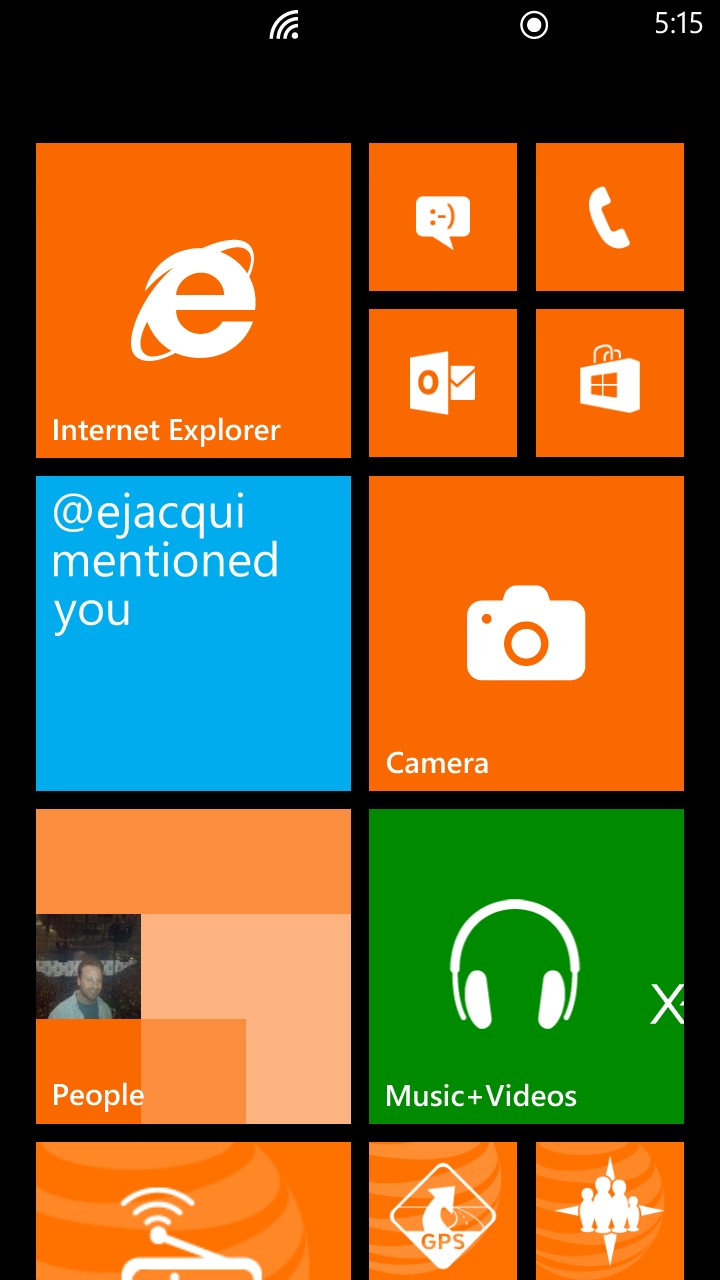
When you think of Microsoft, you typically don't think of design as the company's strongest suit, but it's definitely Windows Phone's trump card. Where iOS and Android cling to desktop-style icons and widgets, Windows Phone's Live Tiles are both more aesthetically striking and more useful. Unlike static icons, the live tiles can give you dynamically updated information, whether it's Twitter mentions, unread e-mails, photos from your camera roll, or game scores. Apps can display basically any information they want, and users can resize tiles to three different sizes to help control how much information is displayed. Unlike the basic icon badges used in iOS and Android, larger live tiles can also show helpful contextual information to let you know exactly what you're looking at.
The operating system's general look and feel are quite slick and fluid as well, and even the simple act of swiping through Windows Phone's home screen and applications looks and feels great. Both the HTC 8X and Nokia Lumia 920 use the same chip as Samsung's Galaxy SIII, the Qualcom Snapdragon S4 Plus, but the Windows phones are much more responsive. Android's responsiveness and fluidity is greatly improved in the latest version, but the aforementioned maze of OEMs and carriers will ensure this update rolls out to current phones belatedly, if at all. Windows Phone 8's update situation should be less complicated—while carriers can choose to delay updates if they wish, Microsoft promised that end users will be able to circumvent this and install the updates anyway.
Another point in Redmond's favor, at least if you work in a Microsoft-oriented business, is Windows Phone's tight integration with both consumer services like SkyDrive and business-oriented services like SharePoint or Office 365. A native Microsoft Office app, something that iOS and Android continue to lack, allows for the easy creation and editing of Office documents with minimal compatibility or formatting problems.
All of that said, Windows Phone hasn't yet found a wide audience. It's a problem from which most of the platform's major issues stem. Windows Phone suffers from a relative lack of apps, especially with some high-profile apps not available (see Hulu, Spotify, Pandora, etc.). Another issue is that some of the most interesting features we pointed out in our review work only with other Windows Phones, something other members of your social and professional circles are statistically unlikely to have.
Looking down the road a bit, another problem will come from the transition between Windows Phone 7 and Windows Phone 8. All Windows Phone 7 apps will continue to run in Windows Phone 8, and the app store doesn't have to start from scratch again as it did just two short years ago. However, apps developed for Windows Phone 8 won't be compatible with Windows Phone 7, and no existing Windows Phone 7 handsets will be upgraded to the new version of the operating system.
This is a troubling attitude on Microsoft's part: we don't know what the company is going to do in the future, but we do know it just burned all of its early adopters (not least the poor souls who bought the Nokia Lumia 900 barely half a year ago). With this as our only precedent, recommending a Windows Phone handset becomes fraught with uncertainty. If you buy a Windows phone now, it will probably be kept up-to-date through the life of a standard two-year contract. But if you'd prefer to wait a few months or even a year to see whether the app situation improves, you might just be buying into an ecosystem with a limited shelf life.

Monday, 3 December 2012

Internet Users Shouldn’t Have to Pay the Price of This International Treaty

0


An 11-year-old girl is enrolled in an online college-level physics course offered by an education company in Silicon Valley; she lives in Lahore, Pakistan. In nearby India, the government has announced a plan to distribute subsidized tablet computers – the Aakash 2 tablet – to equip potentially millions of students and teachers throughout the country. Halfway across the world in Cambridge, Massachusetts, Harvard University and MIT have invested over $60 million in online education platform edX, with the goal of educating 1 billion people. Other universities are following suit via platforms like Udacity, in a trend that promises to revolutionize education.
What do these three seemingly separate instances have to do with a United Nations treaty conference on telecommunications?
Possibly everything.
Starting today, more than 190 governments will come together in Dubai under the umbrella of the U.N. International Telecommunications Union (ITU) in an event called the World Conference on International Telecommunications or WCIT (“wicket”). There, governments will rewrite a 25-year-old treaty, the International Telecommunications Regulations (ITRs), which sets the regulatory framework for the exchange of telecommunications traffic between nations.
Contrary to some headlines: The UN is not trying to “take over the Internet.”
But this treaty could fundamentally alter the way traffic flows across the Internet, and may even create new barriers to access. This is because some of the signatory nations have suggested the treaty not be limited to telecommunications traffic but should be expanded to include regulations for Internet traffic.
In this case, the WCIT presents an opportunity for governments to reintroduce old regulations and maybe apply a more centralized nation-based order to the Internet.

The Internet Society does not believe that a new treaty-based framework is good for the global, open Internet – especially one that regulates how IP networks are managed, alters network architecture, and determines how commercial agreements between network operators should be conducted.

The Unintended Consequences

Education is just one example of the Internet’s potential to transform lives. Let’s think about how decisions made at what may seem like an esoteric treaty conference could potentially impact education.
Time paints the picture of Khadijah Niazi, the young woman in Pakistan studying physics online via Udacity. Her class was comprised of thousands of students from over 125 countries, and Niazi was on her way to becoming the youngest girl to complete the Physics 100 course at Udacity. This wasn’t just a pastime: The course was an entry point for Niazi into higher education – something not easily available in her local community.
Next door, India’s tablet initiative promises to revolutionize the education landscape there. But beyond that, it may alter the market for cellular communications and applications. In a host of developing countries, content creators are poised to put their stamp on this burgeoning space – where apps aren’t just about fighting Angry Birds, but about providing health information and financial tools to a whole new generation of users.
Contrary to some headlines: The UN is not trying to “take over the Internet.”
Most participants in the upcoming WCIT would probably applaud these advances. Yet some of the policy decisions that the governments make these next two weeks could have a significant impact on whether these innovations are able to reach their full potential.
Some telecommunications companies are looking at WCIT as an opportunity to address the business reality that new technologies are severely eroding traditional revenues from old-style voice calls. Customers are no longer making phone calls as they once did, and are instead using an application layer on the Internet to carry voice and video. Landline services are increasingly being replaced with mobile communications services that are themselves increasingly being used to provide data connectivity. Beyond voice, the companies argue that large content providers are making revenue from customers’ access to those services over their Internet connections.
So these companies see this treaty as a way to “re-balance” revenue streams between carriers and “over-the-top” providers. Claiming that regulatory help is needed to ensure the ongoing investment in the Internet’s infrastructure, they have dusted off an old concept known in telecom circles as “sending network pays.” On its face, the idea is simple: The network or ISP of the sending party should pay for the delivery of their traffic (just as with cross-border telephone calls).
But this treaty could alter the way traffic flows across the Internet, and even create new barriers to access.
Now let’s think about this for a moment.
Under a sending-network-pays framework, online education providers like Harvard and MIT would have to pay telecom providers around the world to make their content accessible. In the case of 11-year-old Khadijah, Harvard may have to pay her telecom operator in order to deliver their online courses to Miss Niazi.
Would Harvard pay? edX is just one of a brave new wave of higher-education tools – massively open online courses, or MOOCs. The purpose is to make educational content as broadly available as possible, enrolling an unprecedented number of students in courses for which universities have traditionally capped participation and charged significant fees.
Any additional network payments (by the university or the university sharing the cost with the student) would constrain enrollment, diminishing the global value and potential of MOOCs. It’s far more likely that a content provider like Harvard or MIT would only make their online content available in countries that do not institute these regulations.
Every Internet user is a potential content provider.
Users in countries whose telecom companies demand these charges will therefore be left behind.
Clearly, there are drawbacks for network operators – at a technical level, the sending-party-network-pays concept introduces friction into the network architecture, which inevitably raises costs and impedes the open flow of information across networks. Requiring content providers to establish bilateral relationships with all of the network operators that comprise the global Internet simply cannot be made to scale … because every Internet user is a potential content provider.
Thankfully, these proposals have been met with skepticism by some countries that want to ensure their citizens have access to all the available content on the Internet – not just as passive consumers, but as active creators who also have opportunities to share their own content and services in turn.
So will new platforms like MOOCs come about in the post-Dubai environment? The bottom line is that this global treaty conference matters. The decisions governments make in Dubai can and will have a very real impact on what the globally interoperable Internet looks like, particularly to those who are just now tapping into its potential.

U.K. targets Google, Amazon, Starbucks on taxes

0

Britain is to clamp down on tax avoidance by major international companies after a parliamentary committee dubbed efforts by corporations such as Google, Amazon and Starbucks to minimize the amount they pay in the U.K. as "outrageous."
"Global companies with huge operations in the U.K. generating significant amounts of income are getting away with paying little or no corporation tax here," said lawmaker Margaret Hodge, who chairs the public accounts committee. "This is outrageous and an insult to British businesses and individuals who pay their fare share."
Executives from Google (GOOG, Fortune 500), Amazon (AMZN, Fortune 500) and Starbucks (SBUS, Fortune 500) appeared before the committee last month, as it sought to illustrate the wider problem of corporate tax avoidance.
All three companies say they comply with U.K. tax laws but the pressure is beginning to tell. Starbucks said Monday it was reviewing its approach to taxes in the U.K. "We have listened to feedback from our customers and employees, and understand that to maintain and further build public trust we need to do more," Starbucks said in a statement, adding that it will release more details later in the week.
The British government is stepping up efforts to close loopholes for big companies as an economic slowdown makes it harder to meet revenue targets and in the face of criticism from voters and local businesses who say they are paying an unfair share of taxes.

Why 'Six Strikes' could be a nightmare for anyone with shared Internet

0

No, "six strikes" isn't a phrase from some esoteric version of baseball played on Mars — it's a colloquialism for a new anti-piracy warning system designed to track copyright infringers and help internet service providers (ISPs) take progressively punitive measures to discourage or prevent said infringers from engaging in further copyright-violating activities.
It's essentially an industry workaround, after SOPA and PIPA — bills designed to give the government increased power to battle copyright violators,failed or stalled last year.
But "six strikes" is notably different from either SOPA or PIPA. For starters, it's not a bill. Instead of empowering the government to blacklist sites deemed illicit, it's an escalating warning system managed by ISPs independently. It employs a third-party tool, Mark Monitor, to identify users engaging in copyright-violating activities, then leaves it up to ISPs to take action. ISPs participating at this point include AT&T, Verizon, Comcast, Cablevision and Time Warner Cable.
Say an IP address associated with your account is identified as a violator. Your ISP would first send you a warning, then send further warnings for each infraction, at some point rolling out actual punitive measures, from throttling your bandwidth up to — in theory, a possibility — termination of your service.
The system was supposed to go live this week, but was delayed at the last minute by the Center for Copyright Information (CCI), the group working with the Motion Picture Association of America, the Recording Industry Association of America and several of the nation's biggest ISPs to roll "six strikes" out.
According to CCI executive director Jill Lesser, the delay, due to "unexpected factors," is mostly because of Superstorm Sandy, which "seriously affected" the group's final testing plans. CCI says it now expects what it calls the "Copyright Alert System" to kick off in early 2013, adding:
"Our goal has always been to implement the program in a manner that educates consumers about copyright and peer-to-peer networks, encourages the use of legal alternatives, safeguards customer privacy, and provides an easy-to-use independent review program for consumers to challenge alerts they believe they've received in error.
"We need to be sure that all of our "I"s are dotted and "T"s crossed before any company begins sending alerts, and we know that those who are following our progress will agree."
Regardless of when it goes live, I'm worried about some of those I's and T's — specifically what it's going to mean for me, speaking not as a copyright violator, but as someone whose somewhat unique residential situation poses some awkward, potentially nightmarish alert management issues.
My condo complex (I'm an owner) has 48 units. It was built in 2003, so it's relatively new. At the time, the builders had the foresight to wire each unit with Ethernet — a drop in each room, everything connected back to aggregate wire closets. Near my front door (and all the front doors of all the units) is a mini-wire closet with a switch/hub that connects my unit to a central switch/hub in a locked room on the property.
That, in turn, plugs into a high-speed cable modem — a cable modem that's shared across all 48 units. We're technically shielded from each other using a special box that "firewalls" each private IP and can control how much bandwidth it's allocated, etc. Whether we elect to use it or pay for our own service instead, all 48 units have access to this shared Internet.
You can probably see where I'm headed. With "six strikes," any of the residents in the complex who — knowingly or unknowingly — engage in an act of copyright violation, could incur an alert. Who's going to see that alert? Probably me, as the technical contact for the ISP (that, or our property management company, at which point it'll route back to me).
At this point I'm not sure what happens. The IP address MarkMonitor's software is going to see, presumably, is our public one, not the private address of the device that's been singled out on our condo complex's network. How do we identify the perpetrator? Should we identify the perpetrator? If our ISP says we're in violation, is it incumbent on us to run our own tracking software, somehow, to identify the person(s) involved? Are we supposed to somehow issue these warnings ourselves, since the ISP won't technically be able to?
See the problem? Who's responsible for each infraction? Who should be punished? The entire complex, by throttling or at some point terminating our Internet service? Each unit in the complex pays for shared Internet equally as part of our monthly association fees. We're not a business — there's no CEO. The few of us who manage the Internet on behalf of the rest can't act unilaterally to preempt potential infractions by blocking aspects of the service by introducing content filters the way a private company might.
It's a delicate, thorny issue. Anyone who's been on the board of a housing association knows how tough it can be to promulgate policies to owners, much less policies where the repercussions of violations can't be controlled locally, and where the punishment extends to everyone.
We could put it to a complex-wide vote, but even if a majority were in favor of taking action, say somehow shutting off file-sharing activity entirely, now we're talking about an all or nothing "fix" that also blocks legitimate file sharing — sharing anything not copyrighted, e.g. game or application demos, some music (freely released albums for instance), public domain materials (Project Gutenberg's texts for instance, or public domain art).
I wouldn't vote for neutering my Internet service, would you?
I'm assuming this scenario applies, more or less, anywhere you'll find shared Internet provided by a "six strikes"-participating ISP. We've heard nothing about exemptions. So what about hotels? Restaurants? Coffee shops? Fitness centers? Libraries? Bookstores? RV Parks? Airports? What about municipal initiatives to beam free Wi-Fi to anyone at all, citywide?
Maybe the "workaround" lies in the acknowledgment portion of the process. According to reports, users found in violation of "six strikes" will have to somehow acknowledge they've received and read the alert explaining their account was engaged in illicit activity. Some ISPs are said to be rolling this out as pop-ups (don't ask me how). I'm not sure what that entails for shared Internet access. Does everyone get the pop-up? What happens if you ignore it? What happens if, for whatever reason, the pop-up doesn't appear in the first place?
Like the proverbial tree in the forest, does an alert count as a strike if you don't see (or acknowledge having seen) it?
I'd like to see the CCI and participating ISPs lay all the details about "six strikes" on the table, proactively, instead of letting them trickle out in leaked documents and casual interviews. Don't just backdoor the policy and expect users, especially where Internet's shared, to somehow reverse-engineer what they're responsible for, what happens if they fail to meet some new policy threshold and so forth.
Be upfront with customers. Sure, they already know (or they should) that copyright violations are no-nos, per the terms of their user agreements (and the law), but they deserve to know when policies for policing those terms change, especially when those policies could seriously impact them whether they're personally responsible for a copyright violation or not.
Maybe "six strikes" is not designed to produce lawuits Maybe it really is just an "educational" campaign to raise violation awareness among users. Maybe it's just to remind us that someone's watching (and possibly storing information for potential lawsuits).
Whatever the case, there's a transparency issue here. I'm worried that the absence of public engagement may be intentional — an attempt to manage the perception of what's about to happen by keeping it quiet (or at best, confusingly disclosed), in hopes of preventing another public relations fiasco, like the bill-killing blowup over SOPA and PIPA.
If CCI really wants this to work as claimed — to educate users — then it needs to work with ISPs to lay out the parameters beforehand, addressing scenarios like the one I've described above, "I's dotted and T's crossed."

Sunday, 2 December 2012

Weekend PSA: Keep your computer safe from harm

0


Weekend PSA: Keep your computer safe from harm

A few simple tips to help you keep your PC or Mac protected from ne'er-do-wells.


In 2011, the company identified “…more than 800 end-point vulnerabilities, of which more than 50% were rated as highly or extremely critical and 78% of all vulnerabilities affected non-Microsoft programs,” said Morten R. Stengaard, Director of Product Management and Quality Assurance at Secunia, in an e-mail to Ars. The most targeted data is personal information and business-centric data, which has also been found to be the least protected, and the hardest to secure and defend.
So, taking that extra step to make sure your computer is protected is worth it, and as the saying goes, it’s better to be safe than sorry. Here are a few quick tips for getting your computer security squared away this weekend.

Keep your computer consistently updated

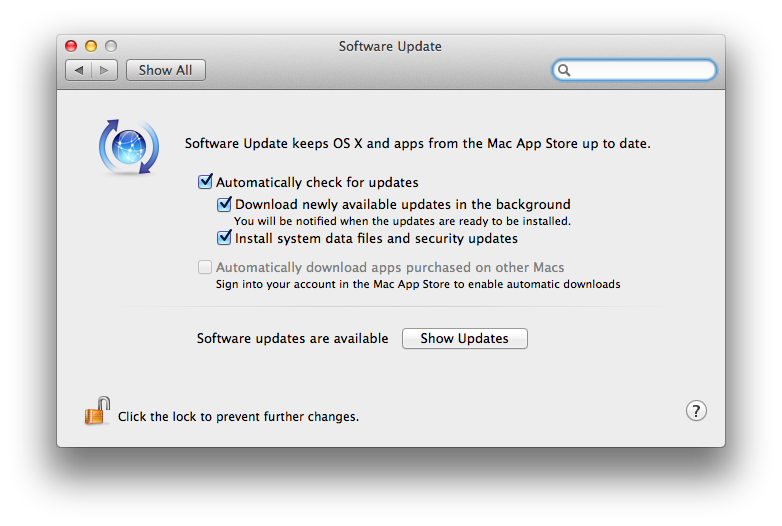
For both Windows and OS X machines, be sure to update them regularly to get the latest patches and fixes for your operating system of choice. As a blog post on Secunia's site notes, “Software programs that aren't updated are one of the most commonly used methods by criminals to take control of private PCs. It is incredibly important to keep the programs updated.” You can set your computer to perform automatic updates so that you don’t have to worry about doing them regularly. In OS X,  head to System Preferences and select Software Update and ensure that your Mac is automatically checking for updates.


For Windows users, go into the Control Panel and navigate to the
 System and Security tab.
 Click on Action center, and make sure Windows Update is set to “On.”
 If it’s not,
 you can change it under the “Change Action Center Settings”
option in the left-hand
sidebar. While you’re here, ensure that Virus protection, and everything else3
 under that,
 is also ticked.


In a phone call with Ars, Randy Abrams, Research Director at NSS Labs Inc., suggested that users actually go out and manually validate that their operating system is up to date. On the Mac, you can do so by selecting Software Update from the Apple Menu in the upper left-hand side of the screen. For Windows users, you can select Windows Update from the Start menu or from the Control Panel. "One of the things malware does is it’ll get in and disable automatic update,” cautioned Abrams. “If you don’t manually validate it you’re not going to know that you've got the problem.”

Consider a third-party virus scanner or security app

If Microsoft Security Essentials feels like it won't be enough for you, consider applications from vendors like Sophos and Eset. Mac users, you can also check out those vendors, or take a gander at intego. Abrams also recommends looking at reports from companies like his own NSS Labs, as well as AV-comparative and Virus Bulliton, which all which all publish a variety of reading material on malware, security, and phishing scams, as well as white papers on anti-virus software. He suggests that users get a feel for what some of the major security products are, what they like, and what they’re comfortable using.
Also, be sure to have a backup plan in case something does go awry. In OS X, a Time Machine backup should do the trick. It will restore your system in case of emergency, and you can encrypt it with FileVault. Mac users should also consider creating a backup Admin account in case they don’t have access to their primary one, which they can do so from the Accounts menu under System Preferences.


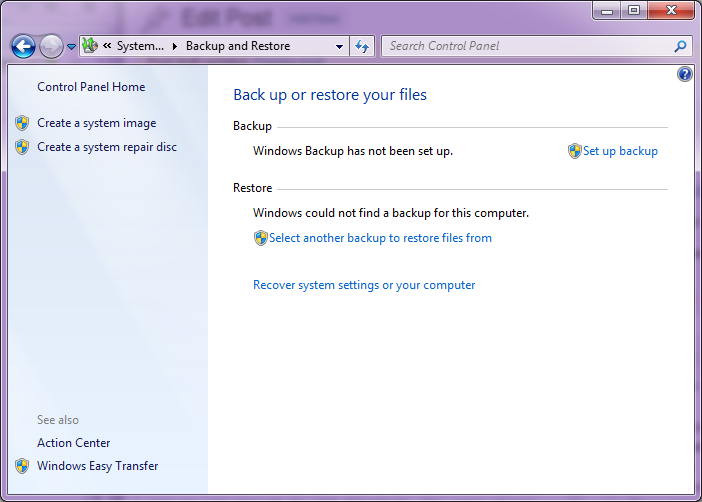
Windows users can access the Backup option in the Control Panel under System and Security.


 Alright, you caught me. I don't have backup set up yet,
 but this is what the screen looks like.


Know when you're being phished


Abrams offers two simple rules to follow that will help eliminate a good chunk of phishing attacks. First, he suggested that if you get an email or instant message asking for your password, do not respond. Second, if you click on a link and it asks you log in, it's better to close that URL immediately. If you get an email from Facebook alerting you that a friend left a comment, navigate to Facebook.com yourself and log in from there to find the notification, rather than clicking through.

Use a password management tool

Abrams highly recommended using a password management program like LastPass or 1Password to ensure that the master password is extremely good. That means it needs to be long and contain a few numbers or symbols. “The length is actually more important than the characters,” he added. Abrams also mentioned that choosing common sentences and Bible verses will probably get “hashed” or figured out. As a rule of thumb, you should also avoid using names, words, or anything found in book that could be easily guessed.  As for security challenge answers, he suggested that users make them up, rather than give the actual answer to the question. Just make sure to write it down somewhere.

Keep your laptop tied down


Computer security also means ensuring that your hardware stays within arm's reach. If your laptop model supports it, you can investin a laptop lock that snaps on to the hardware and loops around a table leg or any other piece of furniture that is immovable. Laptop locks work for any sort of public environment, including cubicles, libraries, coffee shops, or dorm rooms.

Apple CEO Tim Cook Walks Through Grand Central, Hardly Anyone Notices

0
Tim Cook gave his first TV interview as Apple CEO this week to NBC’s Brian Williams.
The segment, which airs Dec. 6 at 10 p.m. ET on Rock Center, will show Cook stroll through parts of Grand Central Terminal in New York virtually unnoticed. The show’s Twitter account shared this photo:


EXCLUSIVE: Apple CEO Tim Cook with in his 1st TV interview airing Dec. 6 on


EXCLUSIVE: Apple CEO Tim Cook with in his 1st TV interview airing Dec. 6 on Rock Center


With Rock Center host Williams by his side, Cook visited the Grand Central Apple Store and shook hands with red-clad employees and excited customers. 

Coincidentally, the Cook interview will broadcast on the same day as the Apple vs Samsung hearing.

© 2013 iPRESS. All rights resevered. Designed by Templateism